Working From Home in the Philippines: A Practical Guide for IT Professionals
Remote work lets you build an international IT career without leaving your province. But anyone who has lost power in the middle of a client demo knows that working from home in the Philippines takes more than a laptop and a Wi-Fi password. This guide covers what actually matters: a reliable connection, backup power, a workable schedule across time zones, and a setup that keeps you healthy and productive.
Key Takeaways
-
Reliable internet needs a primary fiber line and a mobile backup from a different network.
-
Backup power for brownouts: a UPS for short interruptions and a power station for longer outages.
-
Time-zone overlap, a quiet workspace and clear boundaries make remote work sustainable for years.
1. Get the Right Internet Connection
Your connection is your office. For video calls, screen sharing and pushing code, aim for at least 25 Mbps download, and pay attention to upload speed and latency (ping) as well. Upload matters for video calls and file transfers; low ping matters for calls and remote desktop sessions.
Choosing a fiber provider
The three big fiber providers are PLDT, Converge and Globe. In a Q1 2026 SpeedGeo ranking, Converge had the highest average download speed, PLDT had the lowest ping, and Globe trailed slightly on speed. In practice, the best provider is the one that works well on your street. Before you sign:
- Check serviceability at your exact address. Coverage differs per barangay, sometimes per building.
- Ask your neighbors which provider is stable in your area, especially during rain and evenings.
- Read the contract. Some fiber plans come with a lock-in period of up to 36 months.
- Prefer plans with good upload speed. Some providers offer symmetrical plans (same upload and download).
Always have a backup line
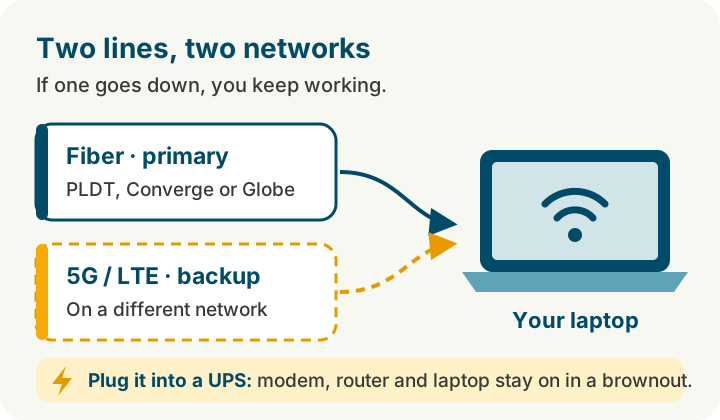
Fiber lines get cut, and repairs can take days. A backup from a different network keeps you working:
- 5G or LTE prepaid home Wi-Fi (Globe, Smart or DITO). No monthly contract; you only load it when you need it.
- Mobile hotspot from your phone, with a data promo you can activate quickly.
Test the signal of your backup at your desk before you depend on it. A strong signal outside can be weak indoors.
2. Plan for Brownouts
Power interruptions are a fact of life in many areas. In May 2026, rotating brownouts hit Luzon and the Visayas for several days after power plants and transmission lines tripped during the heat season. Local, unannounced interruptions happen too, especially during storms.
A setup that works:
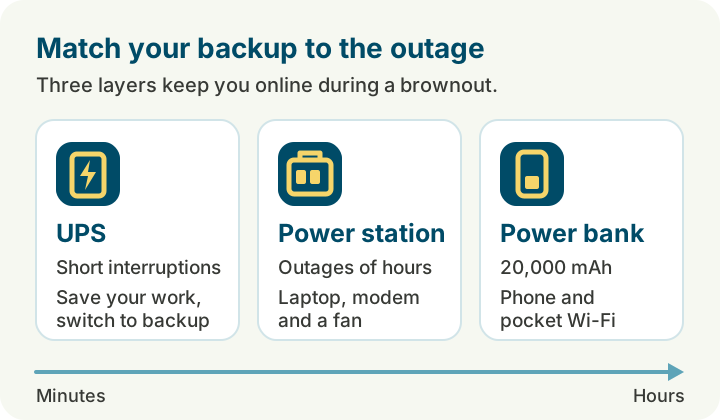
- UPS (uninterruptible power supply) for your modem, router and laptop or PC. A small UPS bridges short interruptions and gives you time to save your work and switch to backup.
- Portable power station for longer outages. A unit of a few hundred watt-hours keeps a laptop, modem and fan running for several hours.
- Power bank (20,000 mAh) for your phone and, with the right cable, a pocket Wi-Fi.
- Laptop over desktop. A laptop's own battery is your first line of defense.
Stay ahead of interruptions:
- Follow your distribution utility (Meralco or your electric cooperative) for scheduled maintenance.
- Watch NGCP grid alerts: a yellow alert is a warning, a red alert means rotating brownouts are likely.
- Tell your team early if an outage affects a meeting. A short message beats silence.
3. Make Time Zones Work for You
Many remote IT roles in the Philippines serve clients in the US, Europe or Australia. Each region gives a different rhythm:
- Australia is 2 to 3 hours ahead of Manila. Your day overlaps almost fully with your client's.
- Europe is 6 to 7 hours behind. A European morning starts in the Philippine afternoon, so a schedule from late morning to evening gives you good overlap.
- US time zones are 12 to 16 hours behind. Overlap means early mornings or late evenings, or an agreed window of a few shared hours.
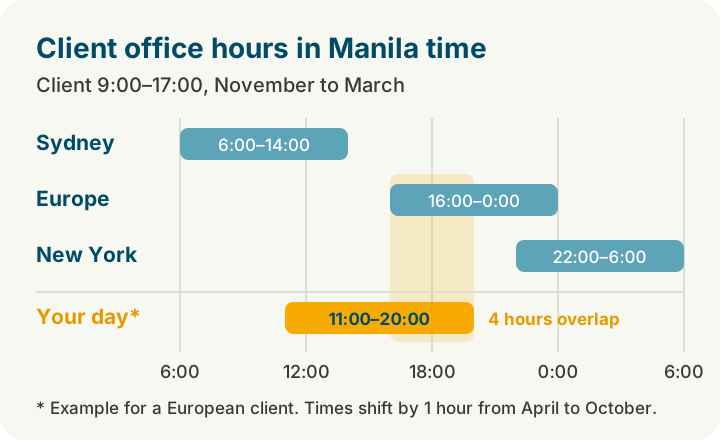
Agree on fixed overlap hours with your team, protect them for meetings and quick questions, and use the rest of your day for focused work. Write things down: a clear update in the team chat saves a meeting across time zones.
4. Set Up a Workspace That Lasts
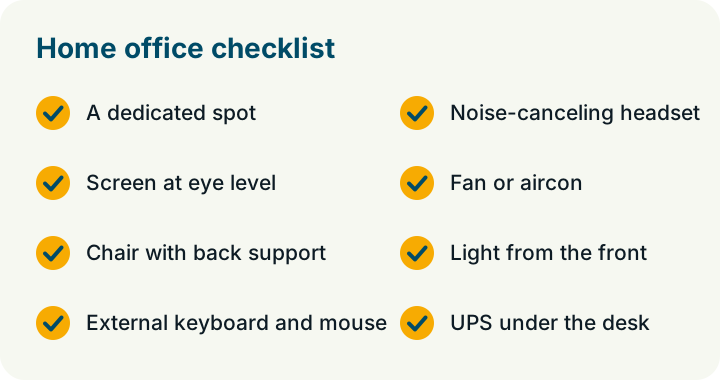
You will spend thousands of hours at your desk. Invest in it:
- A dedicated spot. Even a corner of a room works, as long as it is yours during work hours.
- A good chair and screen height. Put your screen at eye level; use a laptop stand and an external keyboard and mouse.
- A headset with a noise-canceling microphone. Roosters, tricycles, construction and the neighbor's videoke are part of life; your client doesn't need to hear them.
- Cooling. A fan or aircon keeps you and your equipment from overheating in the hot months.
- Lighting. Light from the front or side makes video calls clearer and saves your eyes.
5. Prepare for Typhoon Season
Typhoon season runs roughly from June to November. Strong winds and flooding can cut power and internet for longer than a normal brownout, so prepare before the storm arrives.
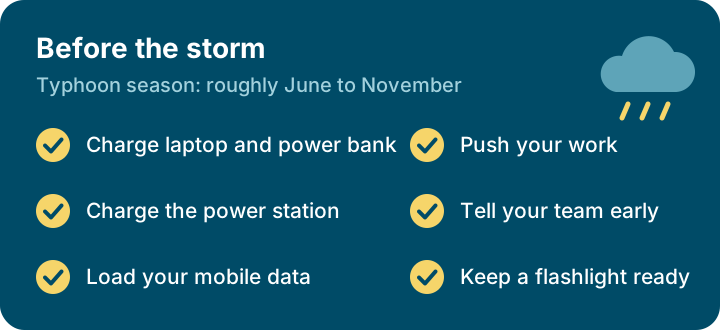
Tell your team in advance if your area is in the storm's path, so they can plan around a possible outage.
6. Protect Your Work and Your Client's Data
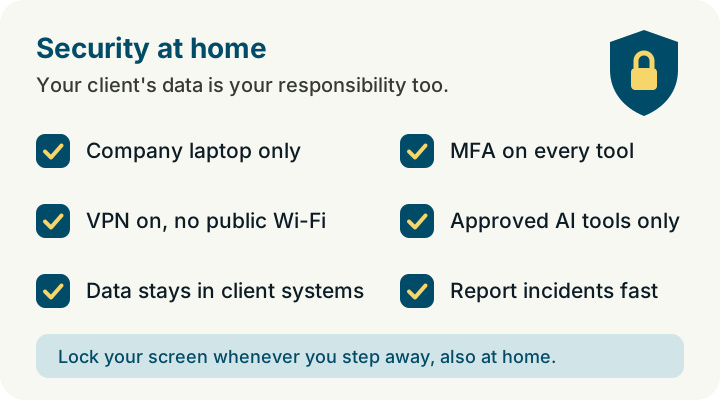
International clients trust you with their code, systems and customer data. At home, you are the first line of security. These are the habits that matter:
- Work only on your company laptop. A managed, encrypted laptop with endpoint protection keeps client work separate from your personal devices. Let security updates install, and don't share the laptop with family members.
- Always connect through the VPN, and never use public Wi-Fi for client work, not even in a coffee shop with a good signal.
- Keep client data in the client's systems. Work inside the client's repositories and tools, and don't keep copies of code or data on personal drives, USB sticks or personal cloud accounts.
- Use multi-factor authentication (MFA) on your email and every work tool.
- Use only approved AI tools. Never paste client code or data into a personal AI account. Use the tools your client or employer has approved for that project.
- Lock your screen whenever you step away, also at home.
- Report a lost laptop or a suspicious login right away. Fast reporting limits the damage.
7. Keep Boundaries and Stay Healthy
Remote work is flexible, which makes it easy to work too much:
- Start and end your day at set times, and close your laptop when you're done.
- Take real breaks and move. Step outside, stretch, eat away from your desk.
- Stay connected with colleagues: join team events and say hello in chat.
Know Your Rights as a Remote Worker
The Telecommuting Act (Republic Act No. 11165), in force since 2019, sets the rules for work from home in the private sector. Telecommuting is voluntary, and your terms (work hours, overtime, rest days and leave) may not be below the legal minimum. Remote employees are entitled to the same treatment as office-based colleagues, including the same access to training and career development.
How We Support Remote Work at Global BrainForce
At Global BrainForce Philippines, remote-first is how we work. Our developers, QA engineers and team leads work from all over the Philippines for clients in the US, Europe and Australia. We provide a managed, encrypted laptop with VPN and endpoint protection, help you set up your home workspace during onboarding, and offer flexible schedules with agreed overlap hours. You work inside our clients' own systems, under the same security practices we promise our clients. What we ask from you is what this guide covers: internet of at least 25 Mbps, a quiet workspace and backup power.

For colleagues who like to meet in person, our Makati office is open to connect with the team. Read how our colleagues build their careers from home on our Success Stories page, or see our current openings.
Summary
Working from home in the Philippines works best with a solid setup: a fiber connection with a mobile backup on a different network, a UPS and power station for brownouts, agreed overlap hours with your client, a healthy workspace and clear boundaries. Prepare once, and you can build an international IT career from home for years.
Frequently Asked Questions
How fast should my internet be to work from home as a developer?
Aim for at least 25 Mbps download with a stable upload and low ping. Stability matters more than peak speed, so check how the connection performs in your area during evenings and bad weather.
What is the best backup power for brownouts?
A UPS for your modem, router and laptop covers short interruptions. For outages of several hours, add a portable power station. A laptop with a healthy battery helps too.
Do I need two internet connections?
It is strongly recommended. Use a different network for your backup, for example 5G or LTE prepaid home Wi-Fi, so one outage doesn't take both down.
Is working from home protected by Philippine law?
Yes. The Telecommuting Act (RA 11165) requires that remote employees get terms at least equal to the legal minimum and the same treatment as comparable office-based employees.
Can I work for an international client from my province?
Yes. With a reliable connection and backup power, location matters much less. At Global BrainForce, colleagues work for international clients from all over the Philippines.